Midjourney Prompts Guide 2026: How To Actually Write Prompts That Render Like A Pro
The first time a Midjourney render actually matched what I had in my head, I sat there for a full minute just staring at it. It took me about four months and roughly two thousand bad images to get to that moment. Nobody warned me how much of the work happens before you type the first word.
If you have been pasting prompts from Pinterest, twisting the same five adjectives, and wondering why your renders still look like generic AI noise, you are not broken. You are working off the wrong mental model. This guide is the one I wish someone had handed me on day one.
I write Midjourney prompts every day for client work, for personal art, and for the templates we ship on GENAIHUB. What follows is everything I have learned about how prompts actually behave inside the V6 engine in 2026, what the parameters truly do, and the workflow I use when I need a usable image in under ten minutes.
The truth most Midjourney tutorials skip
A great Midjourney prompt is not a magic spell. It is a small brief written for a machine that does not understand context the way a human does. The reason most tutorials feel hollow is that they teach you the words to use without ever teaching you the way the model reads them.
Midjourney does not parse your sentence like a search engine. It weights tokens, leans heavily on the first thirty or so words, blends nouns with the visual associations it learned during training, and ignores roughly half of what you write when the prompt becomes too long. The model is a stylist, not a reader.
This single shift changes everything. Once you stop writing prompts like Google queries and start writing them like a creative brief for a moody intern, your hit rate jumps. You also stop blaming yourself when a beautiful sentence produces a flat image, because you understand the model never really saw the sentence the way you wrote it.
Everything in this guide assumes that mental model. Subject first, style second, mood and light third, technical parameters last. We are going to walk through each layer with examples I have actually run.
What a Midjourney prompt really is in 2026
In 2026, a Midjourney prompt is a structured set of cues the V6 and V6.1 engines translate into pixels using a much sharper visual reasoning layer than earlier versions. The model is dramatically better at hands, typography, and physical lighting, but it is also more literal. It punishes vague writing in ways V5 forgave.
A working prompt has four parts that show up in the same order almost every time. There is the subject, which is the thing you want the camera to see. There is the styling, which is the visual treatment, the medium, and the references. There is the atmosphere, which is the lighting, the mood, and the color story. Finally there are the parameters, which are the technical flags that tell the engine how to compose, how creative to get, and which version to use.
Why order matters more than length
Midjourney weights early tokens more heavily than late ones. A twelve word prompt with the right subject first will almost always beat a fifty word prompt that buries the subject in the middle. Length is not authority. Placement is.
The fastest improvement most people can make is cutting their prompts in half and moving the subject to the front. I do this every time a render feels confused. It works far more often than adding more words.
The anatomy of a prompt that actually renders well
Here is the template I keep in my head. Subject doing a clear action, in a specific environment, styled like a specific medium, lit in a specific way, with the parameters that set the canvas. Five components, each one short, each one deliberate.
For example, instead of writing "a beautiful woman in a forest with sun and a dress and very pretty cinematic mood", I would write "a woman in a flowing emerald linen dress walking through a fog filled pine forest, shot on Kodak Portra 400, soft morning backlight, painterly atmosphere". Same idea, completely different result.
The second version works because every phrase carries a strong visual signal the model has been trained on thousands of times. Kodak Portra is a real film stock. Pine forest is a specific environment. Backlight has a clear meaning in photography. The model recognizes these like a stylist recognizes a mood board reference.
Subject phrases that survive the weighting
Strong subjects are concrete nouns with one or two qualifiers. Weak subjects are abstract concepts dressed up in adjectives. "An old fisherman mending a net" beats "a person who is sad and weathered by life experiences". The first one gives the model something it can paint. The second one gives it a feeling it has to guess at.
Real Midjourney prompts from my own runs
Let me show you three prompts that have produced clients work for me in 2026, exactly as I ran them. I am not cherry picking, these are from my history.
The first one was a product hero shot. I wrote "a single matte black ceramic coffee mug on a wet basalt countertop, soft window light from the left, steam rising, deep shadows, photographed on Hasselblad H6D, editorial minimalism, dark teal background --ar 3:2 --style raw --v 6". It rendered in the third generation and we shipped it to the client without retouching.
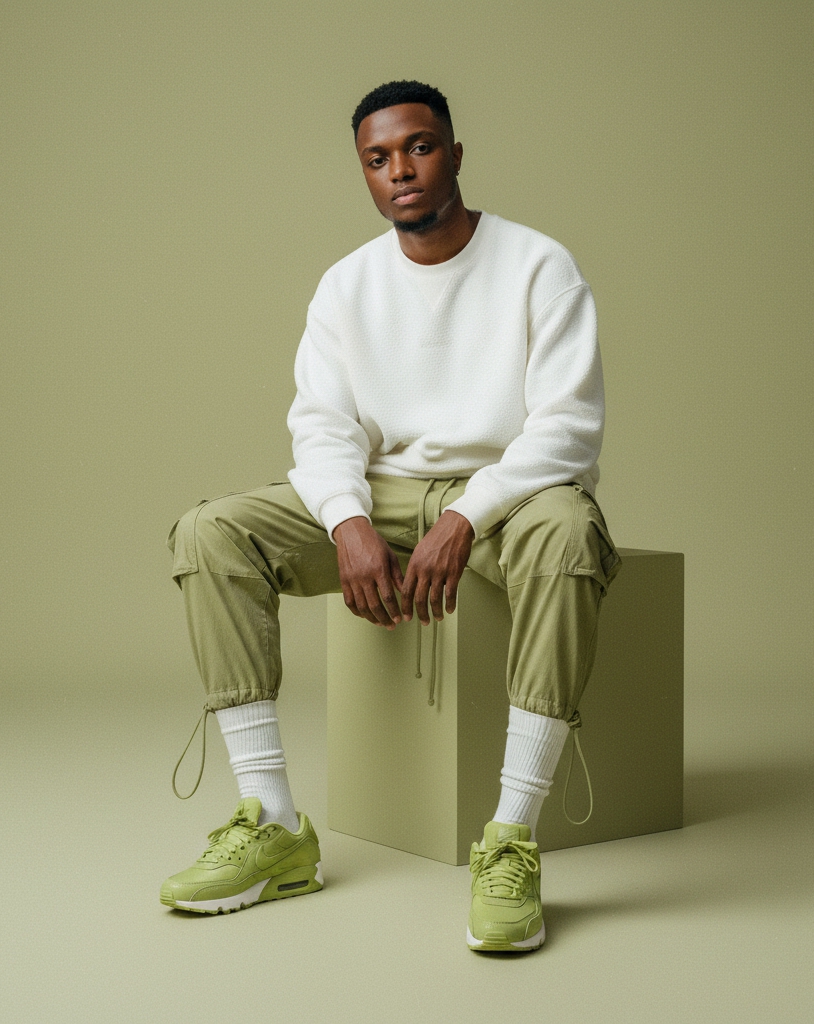
The second was a magazine style portrait. I wrote "Nigerian fashion editor in an oversized cream wool coat, leaning against a brutalist concrete wall, Lagos afternoon light, shot on Mamiya RZ67, kodak Portra 800, slight grain, editorial composition --ar 4:5 --style raw --v 6". Two grids, one upscale, done.
The third was an environment. I wrote "abandoned greenhouse swallowed by ferns and golden hour mist, cracked glass roof, painterly light shafts, Studio Ghibli atmosphere with photoreal textures --ar 16:9 --s 250 --v 6". That one needed five tries because painterly and photoreal pull against each other, but the surviving render is one of my most saved pieces.
The pattern across all three is the same. Real references, real lighting language, parameters that match the use case. No filler words, no vague mood adjectives.
How the V6 engine actually reads your words
Under the hood, V6 tokenizes your prompt and runs it through a text encoder that maps each token to a position in its visual concept space. Then a diffusion model walks backward from noise toward an image that satisfies those concepts, with the parameters acting as constraints on the search.
What this means in practice is that the model is looking for the strongest visual cluster your prompt points to. If your words point to many clusters at once, the result averages across them and you get a render that feels generic. If your words point to one tight cluster, you get a render that feels intentional.
This is also why "trending on Artstation" stopped working years ago. The model no longer associates that phrase with a coherent visual cluster, so it does almost nothing. The same will eventually happen to "cinematic" and "8k". These phrases are slowly losing their meaning because too many prompts use them in too many contexts.
The signal versus noise rule I follow
Before I run a prompt I ask myself one question. If I gave this prompt to a human illustrator with no other context, could they make a single specific image, or would they have to ask me ten questions first. If the answer is the second one, my prompt is not specific enough yet.
Midjourney V6 parameters that actually change the image
There are dozens of parameters in the Midjourney docs, but in real daily work I use six. Knowing these six well will improve your results more than memorizing the full list.
The aspect ratio flag --ar sets the canvas. Use 3:2 for editorial photography, 4:5 for portraits, 16:9 for cinematic landscapes, 1:1 for social squares, and 9:16 for vertical video frames. Aspect ratio also changes composition because the model thinks differently inside different frames.
The stylize flag --s controls how much creative liberty the model takes. The default is 100. Lower values like 50 hug your prompt tightly and feel more literal. Higher values like 500 push toward more decorative and painterly results. I rarely go above 300 unless I want a painterly look.
The chaos flag --c controls the variety inside a single grid. The default is 0. Setting it to 25 or 50 gives you more surprise across the four tiles, which is useful when you are exploring a concept. I drop it back to 0 once I know what I want.
The parameters I use for almost every serious render
The style flag --style raw tones down the default Midjourney aesthetic and gives you more photographic neutrality. I use it on roughly seventy percent of my renders. The version flag --v 6 locks the engine version, which matters because future versions will change behavior. The style reference flag --sref lets you pin a visual style by pasting an image URL, which is the closest thing to consistent branding Midjourney has ever shipped.
If you only remember three flags, remember --ar, --style raw, and --sref. They do more for consistency than every adjective you could add.
What the Midjourney community is actually doing in 2026
I spend a lot of time in the official Midjourney Discord and in the larger creator communities. The biggest shift in the last six months has been the move away from giant prompts and toward short prompts plus style references. People are realizing that --sref is doing more work than fifty adjectives ever could.
The second shift is the rise of prompt libraries. Instead of writing every prompt from scratch, most working creators now keep a personal library of fifty to two hundred prompts that they remix. This is exactly why we built the image prompt templates library on GENAIHUB, because the muscle memory of remixing beats the cognitive cost of writing from a blank page every time. If you want the technical companion to this writing guide, my Midjourney V6 parameters guide walks through every flag I actually use in 2026.
The third shift is collaborative critique. Discord threads where creators paste a render and ask "what would you change in this prompt" are now the fastest learning loop in the space. If you are not in at least one of these communities, your growth curve will be slower than it has to be.
The mistakes that quietly kill your Midjourney renders
The biggest mistake I see beginners make is stacking conflicting styles. Photorealistic and watercolor are not friends. Cyberpunk and Studio Ghibli will fight each other inside the diffusion process and you will end up with mush. Pick one dominant style and one supporting note, never two equal styles.
The second mistake is treating adjectives like seasoning. Sprinkling beautiful, stunning, masterpiece, and epic into every prompt does nothing in V6. The model has been trained on so much labeled data that these words have lost their pull. Replace them with concrete visual descriptions of what beautiful means in your specific image.
The third mistake is ignoring aspect ratio. Running every render in 1:1 because it is the default means you are forcing every composition into a square, even when the image would have wanted to breathe horizontally. Composition is style. Aspect ratio is composition. Treat it like a creative choice.
The negative prompt myth
You will see guides telling you to add long lists of things to avoid. In V6, the --no flag is useful for one or two specific exclusions, but long negative prompts often confuse the model more than they help. Use --no surgically, not generously.
A repeatable Midjourney workflow you can steal today
This is the workflow I run when a client gives me a brief and I need three usable options in under thirty minutes. It has saved me on more deadlines than I can count.
Start by writing a single sentence describing the final image in plain English, as if you were briefing a photographer. Read it back and remove every word that does not carry a visual signal. What remains is your subject line.
Next, add one styling line that names a real reference. A film stock, a director, a painter, a specific era of design. Specificity is what unlocks the model. "Wong Kar-wai" gives you something. "Cinematic" gives you almost nothing.
Then add one atmosphere line covering light direction, time of day, and color story. Light is what makes an image feel real or fake more than any other variable. Treat it with the respect a cinematographer would.
Finally, add your parameters. Aspect ratio first, style raw if you want photographic neutrality, version flag, and any style reference image if you have one. Run the prompt, look at the grid, and pick the tile that is closest to your vision. Upscale it, study what worked, and iterate one variable at a time on the next run.
The one variable rule
When you iterate, change only one thing per generation. If you change the lighting, the lens, and the aspect ratio all at once, you will never know which change moved the result. Treat prompt engineering like a small science experiment, because that is exactly what it is.
The mindset shift that finally made it click for me
For my first year using Midjourney, I was trying to be a wizard. I wanted the perfect incantation that would summon the perfect image. The day I stopped trying to be a wizard and started thinking like a director, my work changed.
A director does not write a perfect sentence and hope the actor delivers. A director gives clear creative direction, watches the take, gives a note, and runs the take again. That is exactly the loop Midjourney is built for. The prompt is your first note, the grid is your first take, and the upscale is the final cut.
Once I started treating every render as a draft and every iteration as a note, the pressure to write the perfect prompt disappeared. My output went up, my quality went up, and weirdly, my prompts got shorter. Confidence does that.
If you want a faster way to build that director instinct, the easiest path is volume with reflection. Run more prompts, but study each result for thirty seconds before you run the next one. Ask what worked, what did not, and which single word you would change. That habit compounds faster than any tutorial.
Start with one prompt today using the workflow above. Save the result, save the prompt, and save a one line note on what you would change next time. Do that for a week and you will be writing prompts in a way that almost nobody on Pinterest is teaching. If you want a head start, our free AI prompt generator can scaffold the first draft for you, and the image prompt templates give you proven starting points to remix. When you are ready to apply the same discipline to text models, my ChatGPT prompt engineering guide and the Gemini prompt guide use the same mental model for words instead of pixels. The rest is reps. For the deepest reference on every flag, the official Midjourney documentation is always worth a bookmark.
Related articles
Midjourney V6 Parameters: The Current Version Guide I Actually Use In 2026
Most parameter lists online are still copied from V5 docs. This is what each V6 flag actually does in 2026, written from the prompts I run every day.
ChatGPT Prompt Engineering Guide 2026: How I Actually Get Useful Answers Every Time
Most ChatGPT prompt guides hand you a list of magic words. This is the one I wish I had, written from two years of using GPT-4 and GPT-5 in real client work.
Gemini Prompt Guide 2026: How I Actually Use Google's Model For Real Work
Gemini is not ChatGPT in a Google coat. It rewards a different style of prompting and most guides online still miss that. Here is what actually works in 2026.
Claude Prompt Engineering Guide 2026: How To Get Editorial Grade Output From Anthropic's Model
Claude rewards careful writing more than any other frontier model. Here is the exact way I prompt Sonnet and Opus when I need editorial quality output the first time.
Sora 2 Prompts: How To Write Cinematic Video Prompts That Actually Render In 2026
Sora 2 will happily render a five second masterpiece or a five second mess from almost the same sentence. After hundreds of generations on real client work, this is the prompt framework that consistently lands the masterpiece.